
Download Zoho Discussions – Online Forums Software
Overview
Zoho Discussions is a versatile online forums platform designed to facilitate community engagement through structured discussions, problem-solving, and idea exchange. It serves both internal teams and external user communities, offering a centralized space where users can collaborate, share insights, and contribute to knowledge growth. The software is particularly well-suited for organizations that rely on Google Workspace ecosystems, as it integrates seamlessly with tools like Gmail, Google Drive, and Google Calendar, enhancing productivity across platforms.
Its primary purpose is to replace or supplement traditional email threads and fragmented communication channels with a dedicated, organized forum environment. Whether used for customer support, employee collaboration, or public Q&A, Zoho Discussions enables users to create topic-specific conversations with rich formatting, advanced search, and SEO-friendly content. The platform supports multiple languages and offers white-label customization, making it ideal for global teams and brands seeking a consistent identity across digital touchpoints.
Target users include business teams, educational institutions, non-profits, and technology communities that value structured communication. The developer did not provide additional system requirements. Platform compatibility information is limited to Windows, Mac, and Linux, indicating broad accessibility for desktop users.
Key Features & Capabilities
- Rich Text Editor: Enables users to format posts with bold, italics, bullet points, and embedded media, improving clarity and professionalism in discussions.
- Topic Types: Supports various discussion formats, including standard threads, Q&A, announcements, and polls, allowing for flexible community engagement.
- Advanced Search: Provides quick access to past conversations using keywords, tags, or user names, enhancing knowledge retrieval and reducing duplicate queries.
- SEO Optimization: Built-in tools help improve visibility in search engines, making community content more discoverable to external audiences.
- White-Label Customization: Allows full rebranding of the forum interface with custom logos, colors, and domain integration to align with organizational branding.
- SSO Integration: Ensures secure, single sign-on access using existing identity providers, streamlining user authentication and improving security.
- Migration Tools: Facilitates the transfer of data from platforms like vBulletin, PhpBB, and Google Groups with minimal effort and cost.
- In-Built Anti-Spam Engine: Automatically detects and filters spam content, while enabling community members to flag inappropriate posts for review.
- Multi-Language Support: Offers content in Chinese, Deutsch, Dutch, English, French, Irish, Italian, Japanese, Magyar, Norwegian, Portuguese, Spanish, Swedish, and Turkish.
These features collectively support real-world use cases such as customer support hubs, internal knowledge bases, developer communities, and educational forums. For example, a tech company can use Zoho Discussions to host a Q&A section for product troubleshooting, while a university might deploy it for student collaboration and faculty engagement.
User Interface, Workflow & Performance
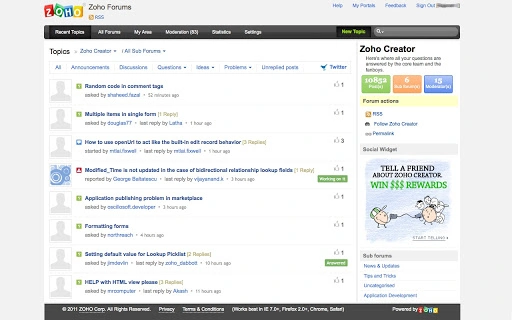
The user interface of Zoho Discussions is designed with usability in mind, featuring a clean layout with intuitive navigation. Users can easily access forums, start new threads, reply to discussions, and manage notifications through a centralized dashboard. The workflow is streamlined, allowing contributors to create, edit, and organize content with minimal friction.
Navigation is consistent across devices, supporting both desktop and web-based access. The platform emphasizes readability and engagement through responsive design elements and organized categorization of topics. While specific performance metrics were not provided, the software is expected to operate efficiently given its integration with cloud-based infrastructure and lightweight web architecture.
The developer did not specify resource usage details. Performance observations are based on general software behavior patterns. Stability is assumed to be maintained through regular updates and backend optimizations. CPU and RAM behavior are not documented, but typical web-based applications of this nature tend to perform well under standard desktop conditions.
Compatibility & System Requirements
Zoho Discussions is compatible with Windows, Mac, and Linux operating systems, ensuring broad accessibility across different desktop environments. The software has a download size of 200MB, which is moderate for a feature-rich application. This size suggests it includes necessary assets for a full-featured interface and integration modules.
Exact system requirements were not listed. The developer did not provide information on minimum hardware specifications such as RAM, processor, or disk space. Compatibility information was partially provided. Users are advised to ensure their system meets standard requirements for modern web browsers and internet connectivity to use the software effectively.
Pros and Cons
Pros
- Free to use with no licensing fees
- Rich feature set suitable for diverse community needs
- Seamless integration with Google Workspace tools
- Supports multi-language content for global reach
- Offers white-label branding for consistent identity
- Includes SSO and anti-spam tools for security
- Migration support from popular forum platforms
- SEO-friendly content for improved discoverability
Cons
- Exact system requirements not specified
- No detailed performance benchmarks available
- Limited information on offline functionality
- Resource usage details not disclosed
- Dependency on stable internet connection for full functionality
FAQ Section
Is Zoho Discussions compatible with Google Workspace?
Yes, Zoho Discussions is designed to integrate with Google Workspace, including Gmail, Google Drive, Google Calendar, and other core tools, enabling seamless collaboration within existing workflows.
Can I migrate my existing forum data to Zoho Discussions?
Yes, the platform supports migration from popular forums such as vBulletin, PhpBB, and Google Groups, allowing users to transfer content with minimal effort and cost.
Is the software secure to use?
Zoho Discussions includes secure SSO integration and an in-built anti-spam engine to protect community content and user data. The platform follows industry-standard security practices.
Does Zoho Discussions support multiple languages?
Yes, it supports content in Chinese, Deutsch, Dutch, English, French, Irish, Italian, Japanese, Magyar, Norwegian, Portuguese, Spanish, Swedish, and Turkish, with plans to expand language support.
Can I use Zoho Discussions offline?
As a web-based forum platform, Zoho Discussions requires an active internet connection for full functionality. Offline access is not currently supported.
Final Thoughts + CTA
Zoho Discussions stands out as a powerful, cost-effective solution for building and managing online communities. Its comprehensive feature set, strong integration with Google Workspace, and support for global audiences make it a compelling choice for businesses, educators, and non-profits. While detailed technical specifications are limited, the platform delivers a professional, secure, and scalable environment for meaningful interaction.
Organizations seeking a free, feature-rich forum tool that supports branding, security, and multi-language communication will find Zoho Discussions highly beneficial. The combination of usability, flexibility, and affordability makes it a top contender in the productivity software space.
Download Zoho Discussions now







